What we are building
I wanted to show the song I am currently listening to on my portfolio. If I am not playing anything, the widget should show my most recently played track instead.
The full setup has two parts:
- Get permission from Spotify and save the access and refresh tokens.
- Use those tokens in a Next.js API route to fetch the current or recent track.
Create a Spotify app
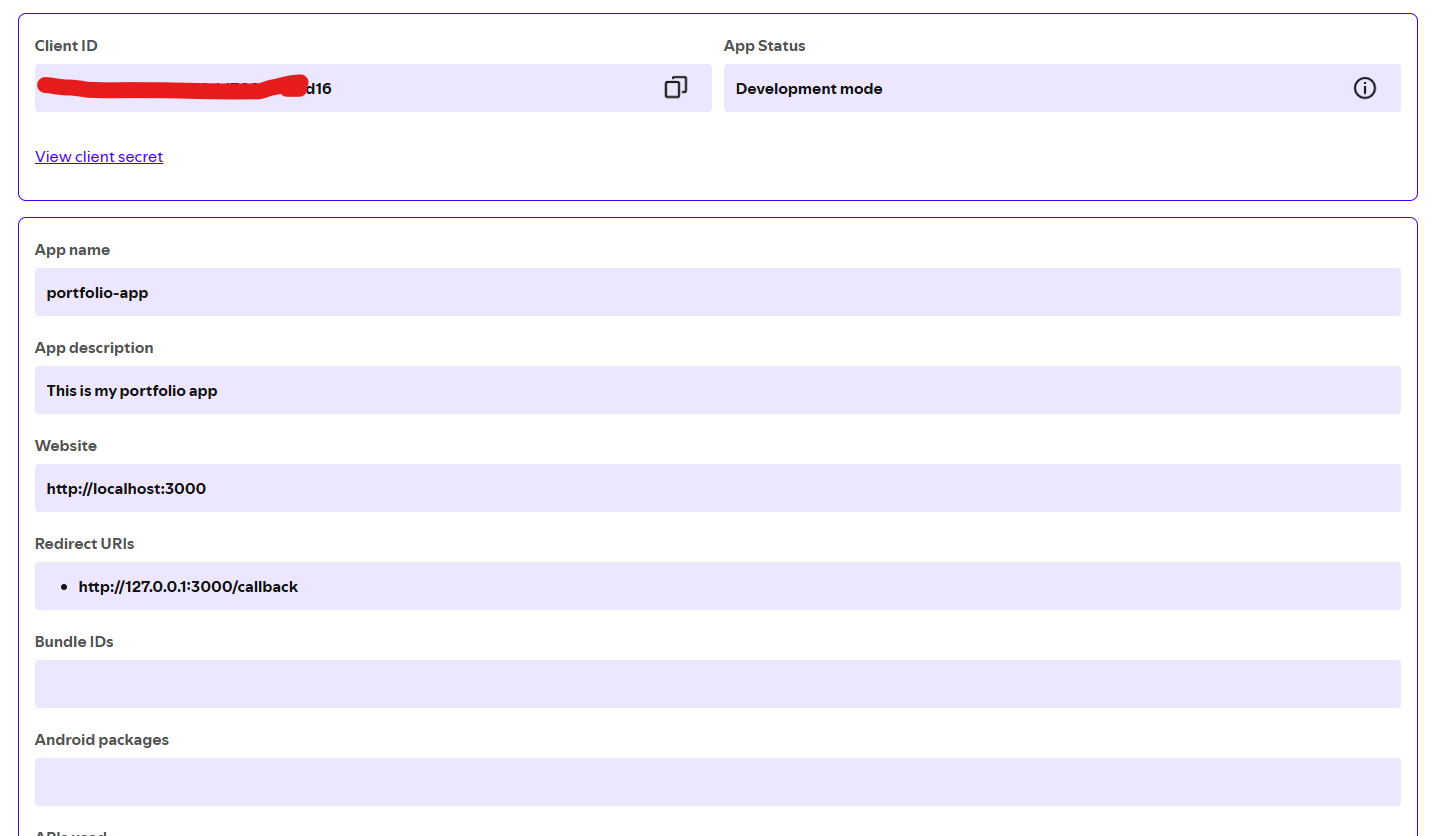
Go to the Spotify Developer Dashboard and create a new app.
After creating the app, copy the Client ID and Client Secret. You will need
both of them when requesting tokens from Spotify.
Set the redirect URI to:
http://127.0.0.1:3000/callback
The redirect URI must match exactly in every place: the Spotify dashboard, the authorization URL, and the token request.
Ask Spotify for permission
Next, open an authorization URL in the browser. This asks Spotify for permission to read data from your account.
For a currently listening widget, these two scopes are enough:
user-read-currently-playing
user-read-recently-played
You can check all available scopes in the Spotify scopes documentation.
Use this URL after replacing YOUR_CLIENT_ID:
https://accounts.spotify.com/authorize?response_type=code&client_id=YOUR_CLIENT_ID&scope=user-read-recently-played%20user-read-currently-playing&redirect_uri=http%3A%2F%2F127.0.0.1%3A3000%2Fcallback&state=someRandomState
Spotify will ask you to approve the app. After approval, it redirects to your
redirect URI with a code in the URL.
It will look similar to this:
http://127.0.0.1:3000/callback?code=AUTHORIZATION_CODE&state=someRandomState
Copy the code value. We will exchange it for an access token and a refresh
token.

Exchange the code for tokens
Now send a POST request to Spotify's token endpoint. You can do this with
Postman, Insomnia, Bruno, curl, or any API client.
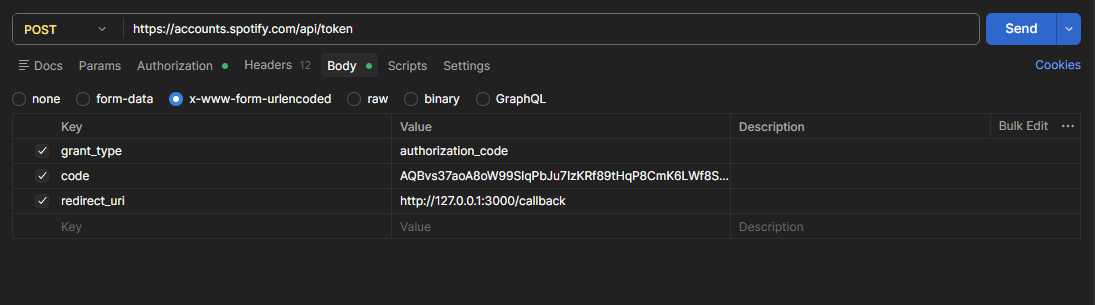
Here is the curl request:
curl --location "https://accounts.spotify.com/api/token" \
  --header "Content-Type: application/x-www-form-urlencoded" \
  --header "Authorization: Basic BASE64_CLIENT_ID_AND_CLIENT_SECRET" \
  --data-urlencode "grant_type=authorization_code" \
  --data-urlencode "code=AUTHORIZATION_CODE_FROM_REDIRECT_URL" \
  --data-urlencode "redirect_uri=http://127.0.0.1:3000/callback"
The Authorization header uses this format:
Basic base64(client_id:client_secret)
Do not publish your real client secret, access token, refresh token, or cookies in a blog post or GitHub repo.
The response will look like this:
{
  "access_token": "ACCESS_TOKEN",
  "token_type": "Bearer",
  "expires_in": 3600,
  "refresh_token": "REFRESH_TOKEN",
  "scope": "user-read-currently-playing user-read-recently-played"
}
Save both tokens. The access token is used to call Spotify APIs. The refresh token is used to get a new access token when the old one expires.
In my project, I save them in MongoDB:
await SpotifyToken.updateOne(
  { tokenType: "access" },
  { token: accessToken, tokenType: "access" },
  { upsert: true },
);

await SpotifyToken.updateOne(
  { tokenType: "refresh" },
  { token: refreshToken, tokenType: "refresh" },
  { upsert: true },
);
Create the API route
The browser should not talk to Spotify directly because that would expose the
token. Instead, my portfolio has a Next.js API route at /api/spotify.
import { getCurrentPlaying } from "@/lib/spotify/get-current-playing";
import { NextResponse } from "next/server";

export const dynamic = "force-dynamic";

export async function GET() {
  try {
    const data = await getCurrentPlaying();

    if (!data) {
      return NextResponse.json(null, { status: 200 });
    }

    return NextResponse.json(data);
  } catch (error) {
    console.error("Failed to load Spotify track:", error);
    return NextResponse.json(null, { status: 200 });
  }
}
I return null with a 200 status when something fails. Spotify is a nice
extra on the portfolio, so it should not break the whole page.
Get the currently playing track
To get the current track, I call this Spotify endpoint:
https://api.spotify.com/v1/me/player/currently-playing
In my code, it looks like this:
const currentlyPlayingUrl =
  "https://api.spotify.com/v1/me/player/currently-playing";

let currentlyPlayingResponse = await fetch(currentlyPlayingUrl, {
  headers: {
    Authorization: `Bearer ${accessToken.token}`,
  },
});
Spotify can return a few different responses:
200: a track is available.204: nothing is currently playing.401: the access token has expired.
When the request succeeds, I return only the data my UI needs:
return {
  album: item.album.name,
  albumImage: item.album.images[0].url,
  artists: item.album.artists.map((artist) => artist.name).join(", "),
  name: item.name,
  songUrl: item.external_urls.spotify,
  isPlaying: currentlyPlayingData.is_playing,
  trackId: item.id,
  previewUrl: item.preview_url,
};
Fall back to the recently played track
If Spotify returns 204, there is no song currently playing. In that case, I
fetch the latest recently played track instead.
This is the endpoint:
https://api.spotify.com/v1/me/player/recently-played?limit=1
And this is the request from my code:
const recentlyPlayedUrl =
  "https://api.spotify.com/v1/me/player/recently-played?limit=1";

const recentlyPlayedResponse = await fetch(recentlyPlayedUrl, {
  headers: {
    Authorization: `Bearer ${accessToken}`,
  },
  cache: "no-store",
});
This makes the widget useful even when I am not actively listening to anything.
The UI can show Currently Playing when isPlaying is true and
Recently Played when it is false.
Refresh the access token
Spotify access tokens expire after some time. When Spotify returns 401, I use
the refresh token to get a new access token.
This is the token refresh request:
const response = await fetch("https://accounts.spotify.com/api/token", {
  method: "POST",
  headers: {
    "Content-Type": "application/x-www-form-urlencoded",
    Authorization: `Basic ${Buffer.from(
      `${clientId}:${clientSecret}`,
    ).toString("base64")}`,
  },
  body: new URLSearchParams({
    grant_type: "refresh_token",
    refresh_token: refreshToken.token,
  }),
});
After Spotify returns the new access token, I update it in the database:
await SpotifyToken.updateOne(
  { tokenType: "access" },
  { token: newAccessToken },
);
Spotify may also return a new refresh token. If it does, I save that too:
if (data.refresh_token) {
  await SpotifyToken.updateOne(
    { tokenType: "refresh" },
    { token: data.refresh_token },
  );
}
Then I retry the Spotify request with the new access token.
Render the widget in the portfolio
On the frontend, my Spotify component calls my own API route:
const fetcher = async (url: string) => {
  const res = await fetch(url, { cache: "no-store" });
  if (!res.ok) return null;
  return res.json();
};

const { data, isLoading } = useSWR("/api/spotify", fetcher, {
  revalidateOnFocus: false,
  revalidateOnReconnect: false,
  revalidateIfStale: false,
});
Then the UI renders the track name, album art, artist, and status.
{data?.isPlaying ? (
  <span>Currently Playing</span>
) : (
  <span>Recently Played</span>
)}
That is the complete flow: authorize once, save the tokens, refresh the access
token when needed, and expose a small /api/spotify route for the portfolio UI.